
Colour palettes
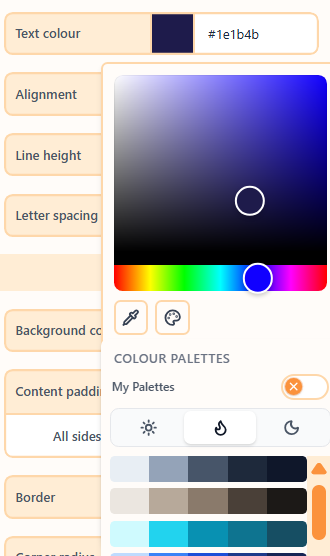
A colour palette is a five-colour ramp. for Light, for Warm, and for Dark. You can also save your own palettes.
What are colour palettes?
A palette is the colour set for the theme overlay: five swatches that drive primary, text, surfaces, and borders. Colour style sits with the palette picker: for Light, for Warm, and for Dark. The same swatches remap when you switch style, so you can try a light page, a tinted page, or a dark page without picking a new palette.
Openly ships a built-in catalogue. Signed-in users can also turn on My Palettes and save their own five-colour ramps to reuse across emails.
How to pick a palette
- Open Themes and turn Apply theme on with Colours enabled.
- Choose a colour style: for Light, for Warm, or for Dark.
- Open the colour palette picker and click a swatch row.
- Turn on Advanced colours if you need zebra columns or outer background.
| Property | Options | Used for |
|---|---|---|
| Colour palette | Built-in catalogue or My Palettes | The five-colour ramp |
| Colour style | for Light, for Warm, for Dark | Which style the palette shows |
Wizard and One Shot use the same palette picker and the same colour style icons: for Light, for Warm, and for Dark.
How to make your own palettes
- Open the colour palette picker.
- Turn on My Palettes.
- Sign in if you are asked, then choose Add palette.
- Edit the five swatches. Click a saved row to apply it to the email.
You can save up to 20 palettes on your account. Colour style hides while My Palettes is open; turn the toggle off to use for Light, for Warm, or for Dark again on the applied ramp.
Related
Still need help?
Contact Support and we will get back to you.
Feedback or suggestions?
Report a bug or share an idea.