
Typography
Typography is the type controls on a block: font family, size, weight, line height, letter spacing, and alignment.
What is typography?
Typography is how the words look. On a Text block or Heading block you can set font family, size, weight, colour, alignment, line height, and letter spacing. The same controls appear on List, Button, Menu, and table cells. Inline styles inside the content still win for the characters you marked.
How to change Font Family
Select a Text block or Heading block and open the Properties tab. Use Font family to pick a typeface such as Arial, Georgia, or Verdana. On a Heading block you can also choose the Level: H1, H2, or H3.
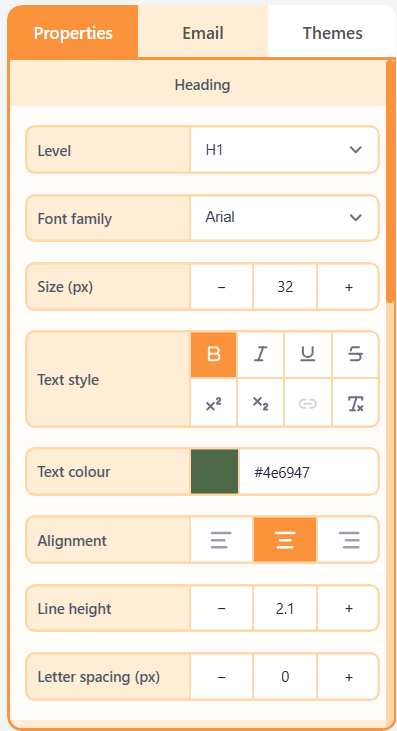
| Property | Options | Used for |
|---|---|---|
| Level | H1, H2, or H3 | Heading block only |
| Font family | Arial, Georgia, Verdana, and other web-safe fonts | Which typeface the block uses |
| Size and weight | px, weight, italic, underline, strike | Hierarchy and emphasis |
| Alignment | Left, centre, or right | Where the lines sit |
| Line height and letter spacing | Multiplier or px | Readability and tightness |
Related
Heading blockA Heading block is a title line (H1, H2, or H3) that introduces a section of the email. It is still live text, so recipients can select it and it scales with their inbox.Text blockA Text block is body copy in a column: one or more paragraphs that recipients read. You can add links, bold, italic, underline, and other inline styles inside the paragraph.
Still need help?
Contact Support and we will get back to you.
Email support@openly.email
Feedback or suggestions?
Report a bug or share an idea.