
Layers
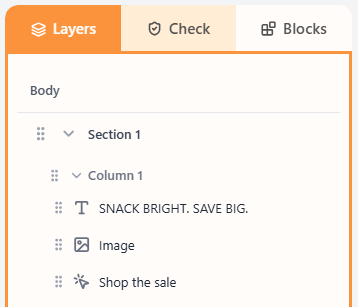
Layers is the structure tree: Body → Section → Column → blocks. Select a layer to edit it; drag to reorder.
What are Layers?
Layers is the outline of your email. Every email is a body of sections. Each section has columns. Each column holds blocks. Selecting a layer opens its properties on the right.
Use Layers when you need to select a column or section that is hard to click on the canvas, or when you want to reorder blocks without dragging them across the preview.
How to use the tree
- Open the Layers tab in the left sidebar.
- Click Body, a section, a column, or a block to select it.
- Drag the handle on a layer to reorder it among its siblings.
Related
Still need help?
Contact Support and we will get back to you.
Email support@openly.email
Feedback or suggestions?
Report a bug or share an idea.