
Sections and columns
A section is a horizontal row. Columns sit inside that row and hold the blocks recipients see.
What is a section?
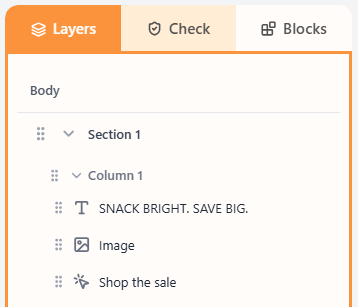
A section is one horizontal row of the email. It sits under Body in Layers, and it can have one or more columns. Background colour, background image, padding, and stack-on-mobile all live on the section.
What is a column?
A column is a vertical slice inside a section. Blocks go in columns, not directly on the section. Set width percent, vertical alignment, padding, and background on the selected column.
How to add
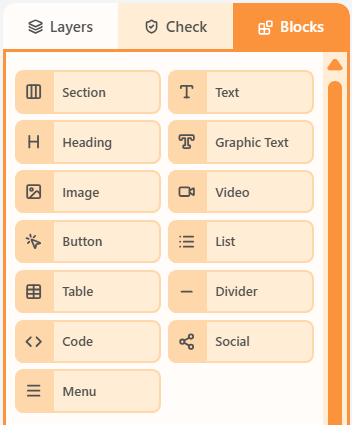
- Open the Blocks tab and drag Section onto the canvas to add a row.
- Choose how many columns you need and their widths.
- Select a column in Layers, then drag content blocks into it.
Properties
Select the section or a column in Layers, then use the Properties tab. Stack on mobile lives on the section. That is how multi-column rows become a single column on phones.
| Property | Options | Used for |
|---|---|---|
| Section label | Optional name | Find the row in Layers |
| Column count and widths | 1–4 columns; equal widths or custom percents | How the row is split |
| Stack on mobile | Off, left-to-right, or right-to-left | How columns wrap below 480px |
| Section background | Colour or image, including Cover Full | The row’s backdrop |
| Section padding, border, hide | px, outline, mobile or desktop hide | Space around the row and visibility |
| Column width | Percent of the section | How wide this slice is |
| Column vertical align | Top (recommended), middle, or bottom | Where short content sits in a tall column |
| Column background, padding, border, radius | Colour, px, outline, corner radius | The look of that slice |
Related
LayersLayers is the structure tree: Body → Section → Column → blocks. Select a layer to edit it; drag to reorder.Blocks paletteThe Blocks palette is the list of things you can drag onto the canvas: Section plus every content block.Responsive: hide, mobile padding, stackResponsive controls change the email below 480px: hide a layer, override padding, stack columns, or let images fill the column.
Still need help?
Contact Support and we will get back to you.
Email support@openly.email
Feedback or suggestions?
Report a bug or share an idea.