
Library
Library is home for everything you save: emails, reusable sections, images, themes, and starter templates.
What is Library?
Library is the home for everything you save. Open it from the Top Navigation Bar. Across the top are six tabs: All, Email, Section, Image, Theme, and Templates. Then search, tags, and the list or grid of items.
Email documents live on the Email tab. Cloud vs local sync is covered in its own article.
The Library workspace
Use search to filter by name. Use tags to narrow a long list. Row or card actions edit, duplicate, or delete. Switch list and grid from the toolbar.
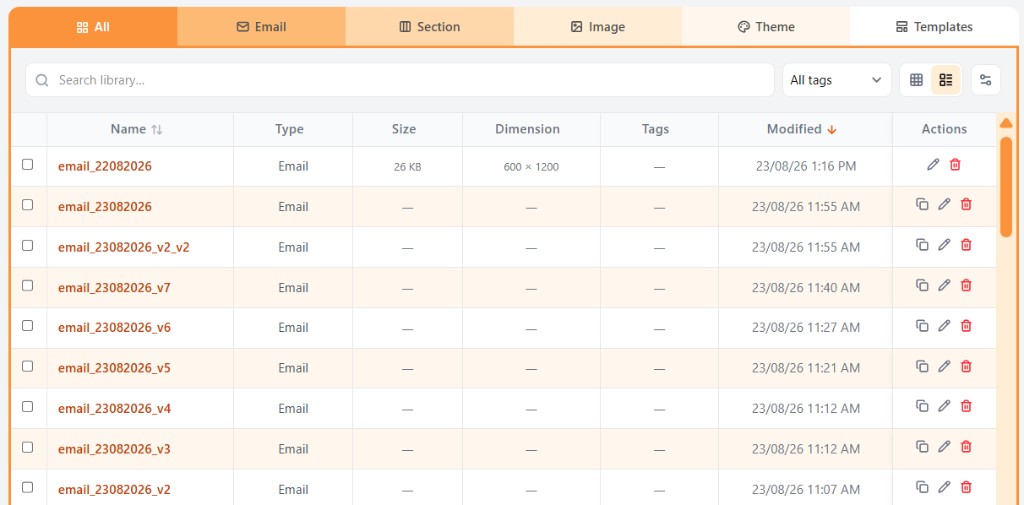
Tabs
| Tab | What it shows |
|---|---|
| All | Every saved item in one list: emails, sections, images, and themes. Use this tab when you want to search across types. |
| Your email projects. Open one to continue in Build. Duplicate or delete from the row actions. | |
| Section | Reusable sections you saved. Drop them onto the canvas from Blocks → My Sections. |
| Image | Uploaded and saved pictures. Upload here, then pick them from Image blocks in Build. |
| Theme | Colour and type themes you can apply in Build. Built-in themes appear here alongside any you saved. |
| Templates | Starter layouts. Pick one to create a new email, then edit it in Build. |
Related
Still need help?
Contact Support and we will get back to you.
Email support@openly.email
Feedback or suggestions?
Report a bug or share an idea.