
The Build canvas
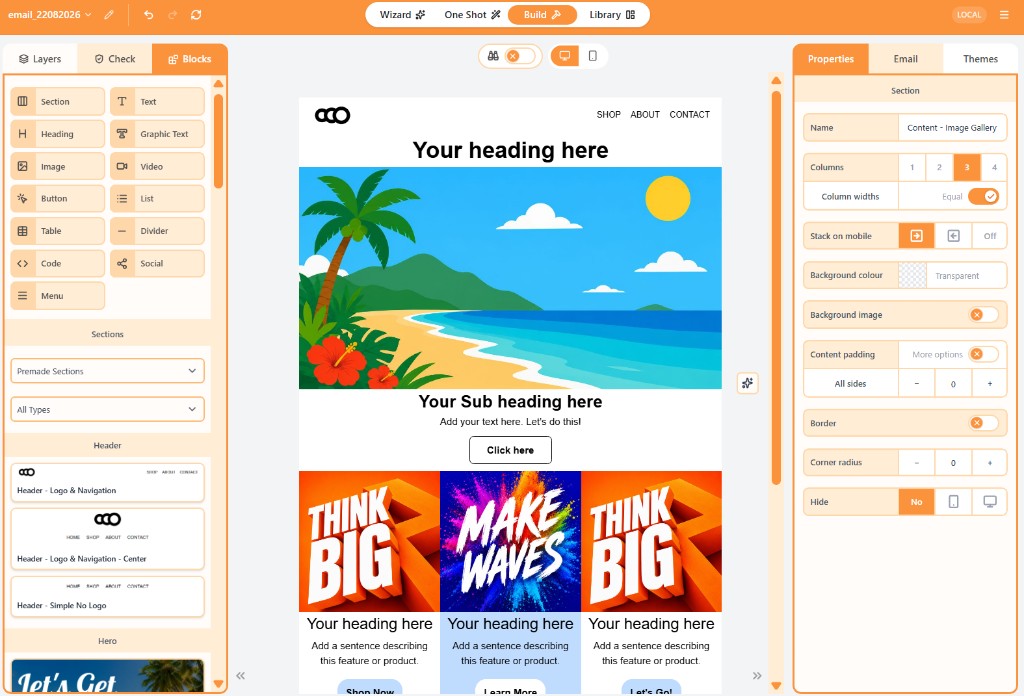
The Build canvas is a live preview of your email. Sidebars hold layers, blocks, health check, and properties.
What is the Build canvas?
The canvas is the email itself: a live preview of the document you are editing. Switch desktop or mobile at the top to see how columns stack and what you hid on each breakpoint.
It is not a separate mock. Preview, export, and send compile this same document.
How the workspace is laid out
The left sidebar switches between Layers, Check, and Blocks. The centre is the canvas. The right panel is Properties, Email, or Themes.
Related
LayersLayers is the structure tree: Body → Section → Column → blocks. Select a layer to edit it; drag to reorder.Blocks paletteThe Blocks palette is the list of things you can drag onto the canvas: Section plus every content block.Properties panel overviewThe right panel has three tabs: Properties for the selected layer, Email for subject and body chrome, and Themes for the whole email.
Still need help?
Contact Support and we will get back to you.
Email support@openly.email
Feedback or suggestions?
Report a bug or share an idea.