
Wizard
Wizard is a guided AI flow with Layout, Images, and Copy tabs. When the draft looks right, open it in Build.
What is Wizard?
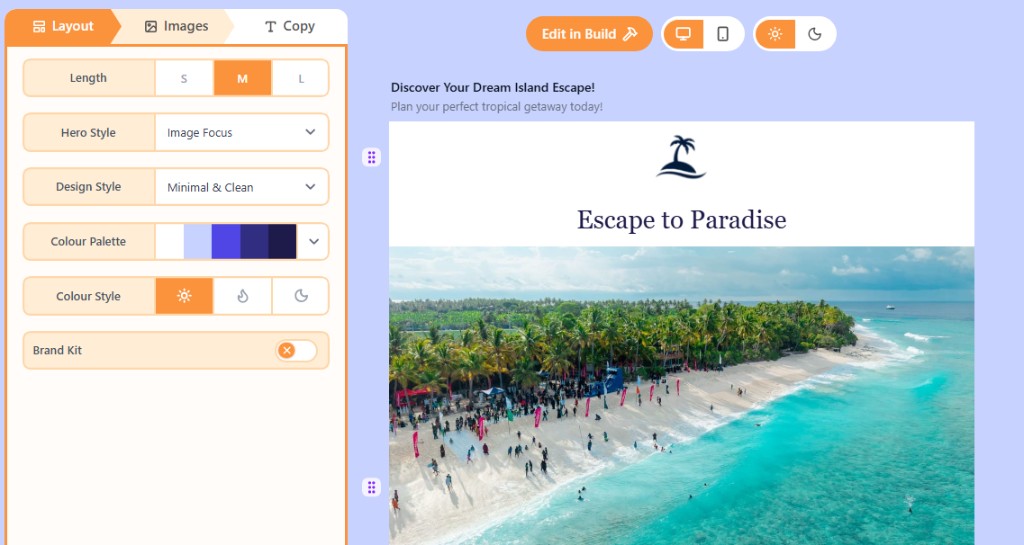
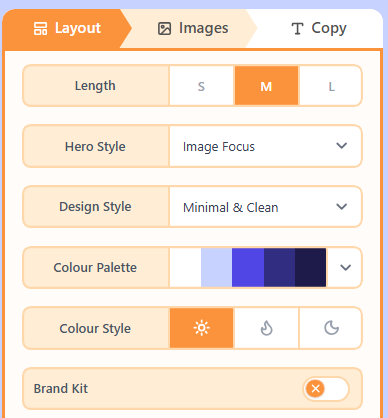
Wizard is the stepped AI Hub. Layout chooses length, hero style, design style, palette, colour style, and Brand Kit. Images and Copy then fill the draft. Edit in Build opens the full canvas.
How to use the three tabs
- On Layout, set length, hero, style, palette, and Brand Kit, then generate the structure.
- On Images, assign photos, logos, and icons.
- On Copy, write a brief and generate the wording.
- Choose Edit in Build to finish links, spacing, and any block the AI did not cover.
Related
Wizard Images and Brand KitThe Images tab fills photo, logo, and icon slots. Brand Kit on Layout can pull colours and a website logo into the draft.Wizard CopyThe Copy tab writes the email wording from a short brief, purpose, and tone.One ShotOne Shot generates a full email draft from a single prompt. Refine style and chat, then Edit in Build.How credits and usage workOpenly tracks three monthly meters while we are in beta: AI credits, exports, and test sends. They reset on the 1st of each month (UTC).
Still need help?
Contact Support and we will get back to you.
Email support@openly.email
Feedback or suggestions?
Report a bug or share an idea.